Protect the people who trust you.
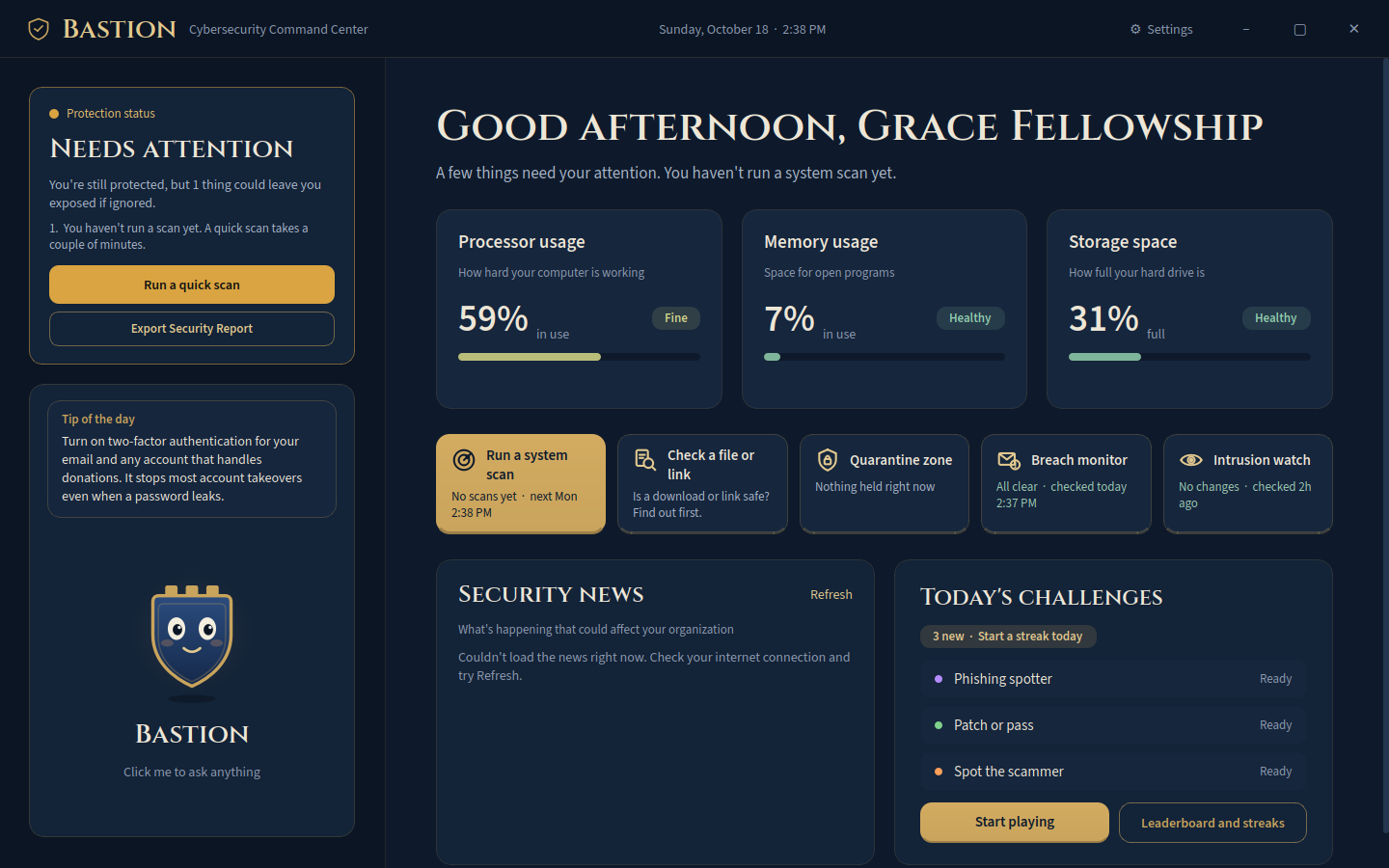
Bastion CC is antivirus and security training in one simple app. It scans your computers for threats, watches for leaked staff passwords, explains every result in plain English, and trains your staff and volunteers with five-minute daily games on phishing, scams, passwords, updates, and more.
- Faith-based organizations
- Nonprofits
- Food pantries and shelters
- Schools
- Community groups
Scammers count on small teams being too busy to notice.
internet crime complaints filed with the FBI in 2025, up from 859,532 the year before.
lost by Americans to cyber-enabled crime in 2025, up from $16.6 billion in 2024.
lost to business email compromise: the fake "the director needs gift cards" and "updated bank details" emails.
$3,046,598,558 in one yearSource: FBI Internet Crime Complaint Center, 2025 Internet Crime Report
Three kinds of protection in one app, made for people who aren't in IT.
Find threats before they spread
Check any file against dozens of antivirus engines, or run a full scan of the computer. When something turns up, choose to quarantine it, delete it, or leave it, with a clear note on what each choice means.
- Quick, Standard, and Deep scans, from 2 minutes to a full sweep
- Suspicious files move to a safe quarantine folder with one click
- Every scan is logged so you can show your board what was checked

Answers your office manager can act on
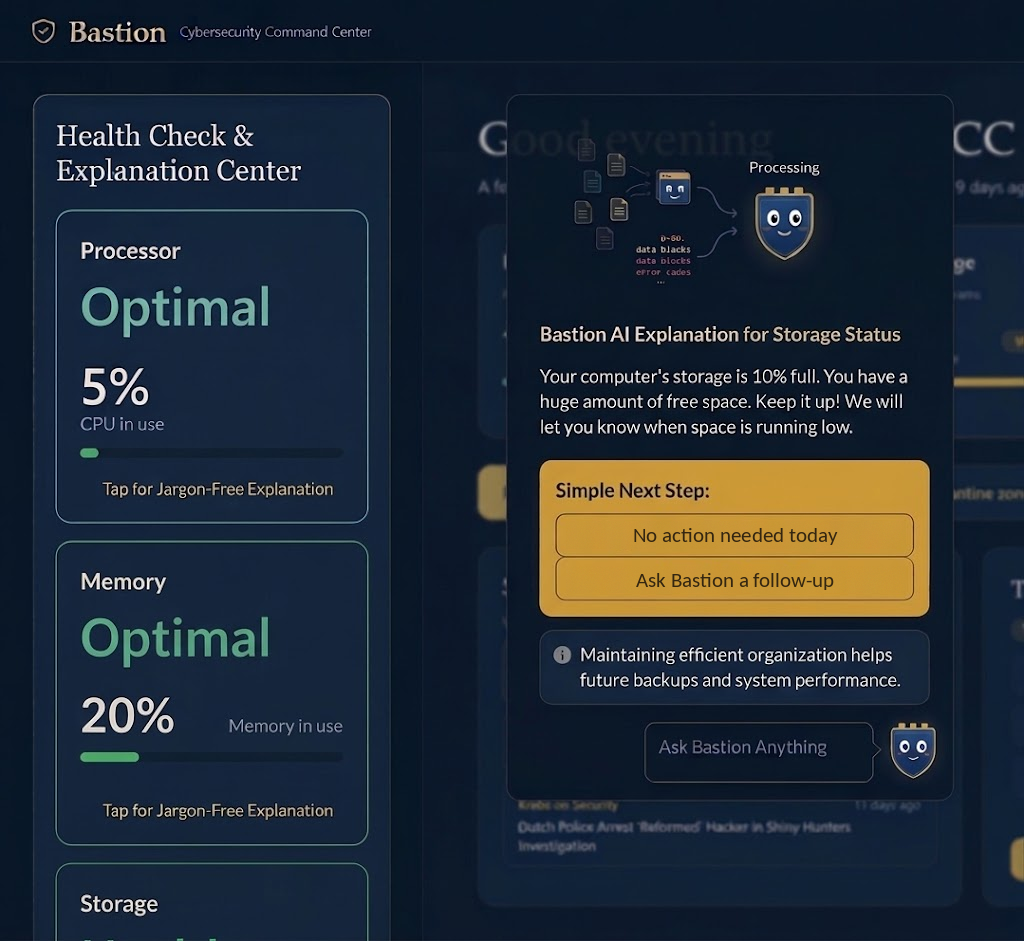
Most security tools speak in error codes. Bastion CC uses AI to turn every reading and alert into two or three plain sentences and one simple next step. No jargon, no guessing.
- Health check for processor, memory, and storage, color coded from Optimal to Critical
- Tap any card for an explanation written for non-technical people
- Your files never leave your computer to get an answer
Training that covers how organizations really get hit
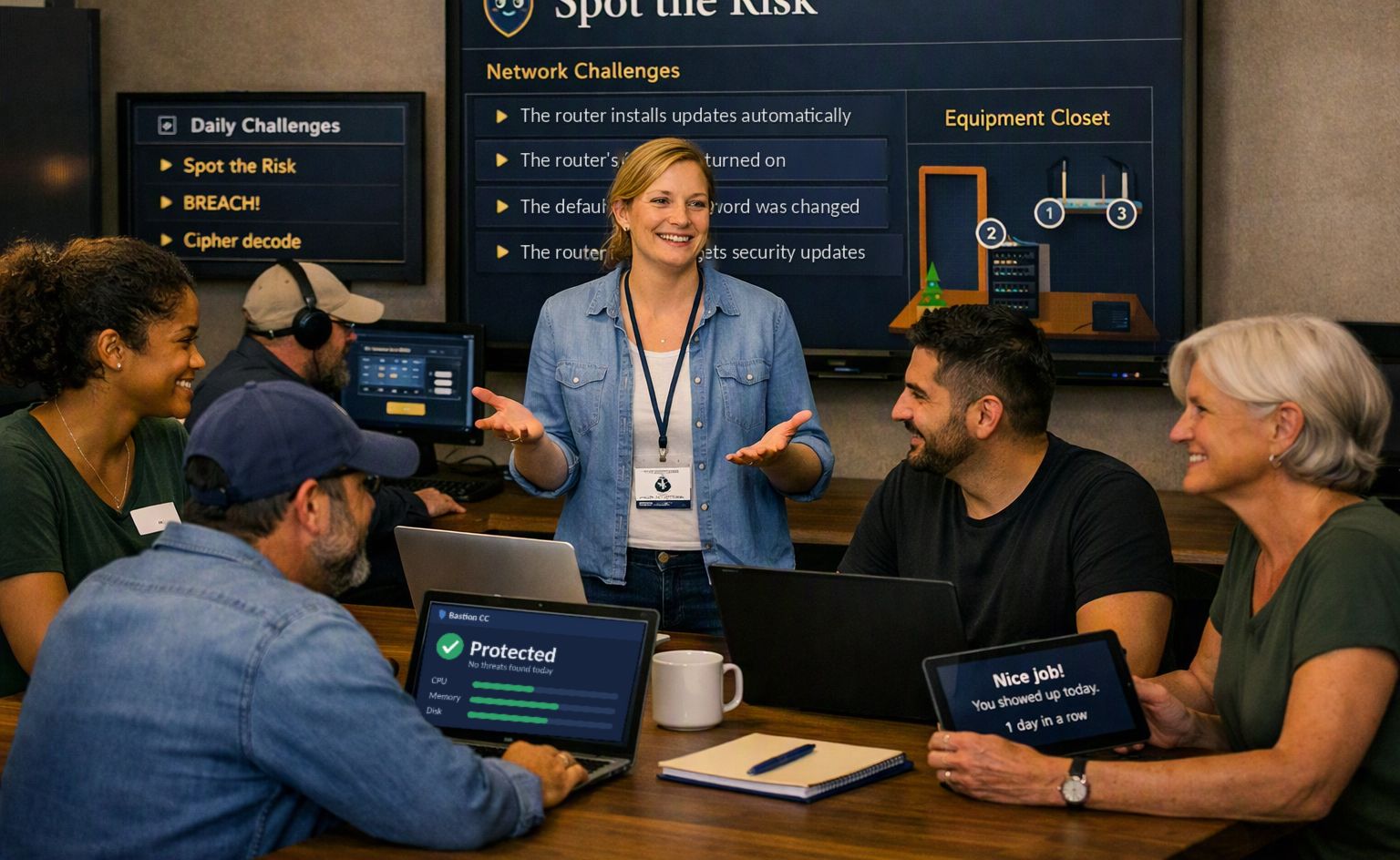
Most breaches start with a person, not a program. Every day Bastion CC serves three short games, drawn from twelve, the same three for your whole team. Together they cover:
- Spotting phishing emails, scam calls and texts, and fake invoices
- Strong passwords and knowing what's safe to share
- Keeping software updated and app permissions in check
- Social engineering and insider threats
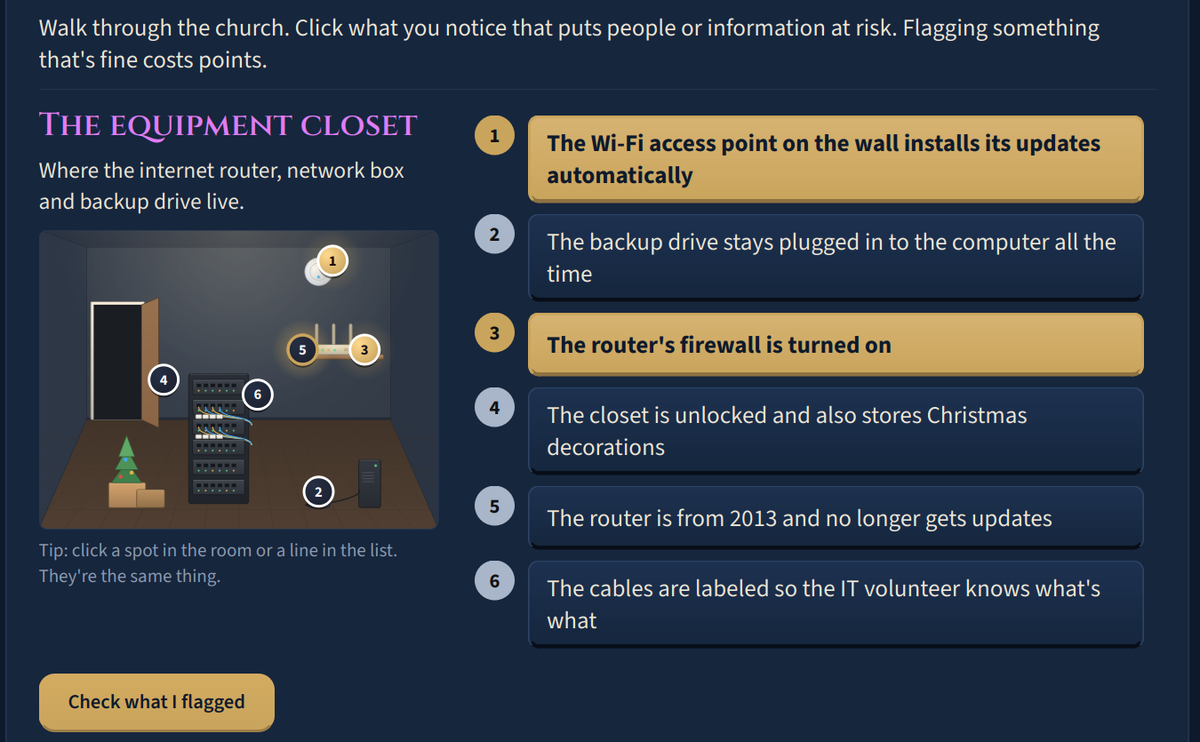
- Walking the building to spot physical risks, like an unlocked closet or a password on a sticky note
- A full year of new questions, so nobody sees the same one twice
- Daily streaks, leaderboards, and a study tip after every game
Find out if your team's login credentials are already out there.
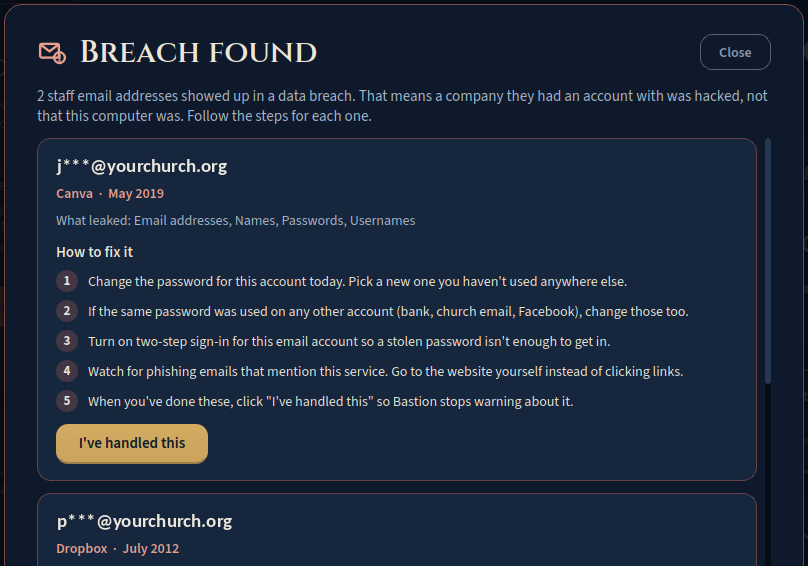
Companies get hacked every year, and the email addresses and passwords people used there get passed around and sold. Most people never find out. If someone on your staff reused that password for work email or the donation account, that account is now open to whoever bought it.
Bastion CC checks your staff email addresses against known data breaches every day, so you hear about it before a scammer uses it.
- 1Checks every dayStaff emails are checked against breach records daily, starting the first time Bastion opens.
- 2Shows exactly what leakedWhich company was breached, when, and what was exposed: passwords, names, phone numbers, or addresses.
- 3Walks you through the fixPlain steps for that specific leak, like changing the password today and turning on two-step sign-in.
- 4Clears when you're doneClick "I've handled this" and the alert goes away. Emails stay masked on the home screen.
Breach data from XposedOrNot. Included in the Sentinel and Fortress plans.
A look inside Bastion CC
One command center for your whole office.
Bastion CC opens to a single home screen that shows what's safe, what needs you, and what to do next. Here's everything it does.
Protect
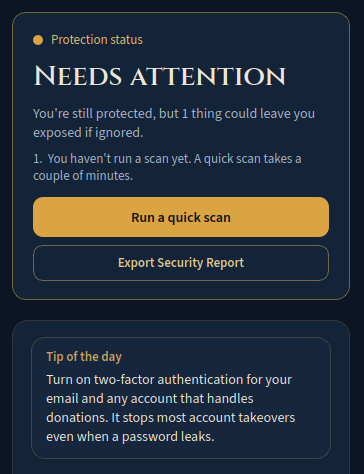
Keep computers clean- Protection statusSecure, Needs attention, or Action needed now, with the next step spelled out.
- Scheduled scansQuick, Standard, or Deep, from every hour to weekly. Missed scans catch up on their own.
- File and link checksCheck a download or link against dozens of antivirus engines before you open it.
- Quarantine zoneFlagged files are locked away where they can't run. Restore or delete them later.
Watch
Spot trouble early- Computer healthProcessor, memory, and storage, explained in plain words. Unusual activity gets flagged.
- Breach monitorChecks staff email addresses against known data breaches every day, shows what leaked, and walks you through the fix.
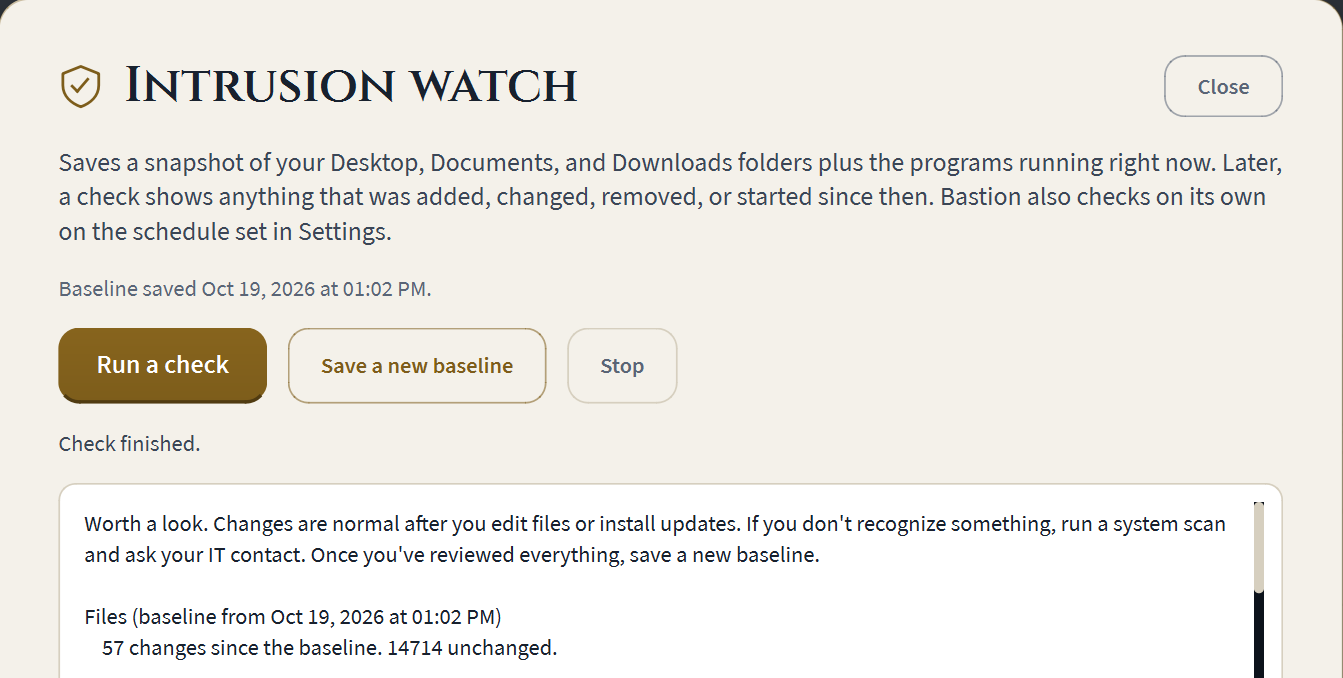
- Intrusion watchSaves a known-good snapshot and flags new programs or changed files for review.
Train
Build better habits- Daily challengeThree new games every day, drawn from twelve, with church and nonprofit examples.
- Real-world topicsPhishing, scams, passwords, updates, permissions, insider threats, and physical security.
- Streaks and leaderboardsDaily streaks and leaderboards keep people coming back.
- Learn as you playEach game opens with a short how-to and ends with a study tip.
Guide
Made for non-experts- Ask BastionAn AI helper that answers security questions in plain English.
- Security reportOne click exports a PDF health report for your board or leadership. Sentinel and Fortress.
- Tip of the dayOne short, practical security habit on the home screen every day.
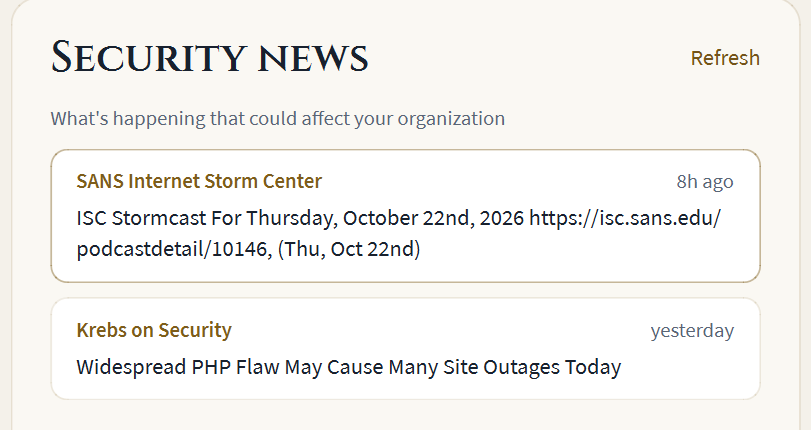
- Security newsCurrent threats that could affect your organization, in plain language.
Some features depend on your plan. Compare plans.
Would your volunteers catch this one?
This is Phishing Spotter, one of the twelve games in Bastion CC. Read the email and make the call.
Example 1 of 3
Every subscription helps give back.
Bastion CC gives 10% of its gross profit, taken off the top, to charitable organizations. Your subscription protects your own team, and part of it goes on to support the work of charities in our communities.
Protect the work your community counts on.
Plans start at $23 a month for your whole office. Join early access to be first in line when we launch.
Your mission runs on trust. Keep it safe.
Faith-based organizations and nonprofits hold donor records, member and client lists, and payroll on a handful of shared computers, usually run by people who never signed up to be IT staff. That is exactly why scammers target them.
It speaks plain English
Every alert comes with a short explanation and one clear next step. Your office manager doesn't need to know what a process ID is to keep the office safe.
It trains your people, too
Software can't stop someone from wiring money to a fake vendor. A short daily challenge builds the habit of pausing before clicking, for staff and volunteers alike.
It fits a nonprofit budget
One subscription covers protection and training for the whole office, priced per organization instead of per person, so adding a volunteer doesn't raise your bill.
Your files stay with you
Scans run on your computer. To check a file, only its fingerprint is looked up, never the file itself. Explanations use the reading, not your documents.
It targets the real threat
Impersonation email is the most common scam aimed at faith-based organizations and nonprofits: a message that looks like it came from a leader, board member, or trusted vendor. The training is built around it.
It's built by a security pro
Bastion CC is built by a Marine Corps veteran with a background in signals intelligence and hands-on experience in forensics and malware analysis.

In every nonprofit wire fraud case reviewed in 2024, the scam ran through a staff member's own email account that had already been taken over.
That finding, from the 2025 Nonprofit Cybersecurity Incident Report by Community IT Innovators, is why Bastion CC pairs antivirus with training. The same report found security awareness training adoption grew by 20 percent as more organizations saw it working.
Source: CGNET summary of the 2025 Nonprofit Cybersecurity Incident Report
What you get with Bastion CC compared with the usual options
| Bastion CC | Free antivirus only | Business security plus training | |
|---|---|---|---|
| Scans for malware | Yes | Yes | Yes |
| Explains results in plain English | Yes | No | Sometimes |
| Daily staff and volunteer training | Yes | No | Yes, separate product |
| Written for faith-based organizations and nonprofits | Yes | No | No |
| Setup without an IT person | Yes | Yes | Usually needs one |
| Typical cost for a 10-computer office | $60/mo | $0 | $100+/mo |
Business estimate based on published rates of about $9 per computer for managed protection plus about $1.75 per person for training (MDRCost).
Before you decide
Does Bastion CC replace Windows Defender?
No. It works alongside the protection built into Windows. Bastion CC adds file checks against dozens of engines, plain-English explanations, scan history, and staff training that Windows doesn't include.
How technical do I need to be?
Not at all. If you can install a program and click a button, you can run Bastion CC. Every result tells you what it means and what to do next.
Is it easy to read and use for older volunteers?
Yes. Anyone can make the text larger or switch to a high-contrast look in Settings, no admin PIN needed. You can also turn off motion so nothing on screen glows, fades or slides.
Can volunteers use the daily challenge?
Yes, at no extra cost. Anyone who uses a protected computer can play. Plans are priced by computer, not by person.
What information leaves my computer?
Only what's needed to answer a question you ask. To check a file, its fingerprint (a SHA-256 hash) is looked up. To explain a reading, the reading itself is sent, such as "Memory 79%, Elevated." If you use the breach monitor, staff email addresses are checked against breach records. Your documents and file names stay on your computer.
Does it work on Mac?
Bastion CC runs on Windows 10 and 11 today. Mac support is planned.
Security built for the people who serve.
Bastion CC started with a simple observation. The organizations doing some of the most important work in our communities, faith-based organizations, food pantries, recovery programs, and small nonprofits, are often the least protected. They hold sensitive information about the people they serve, and they run on volunteers and tight budgets.
Enterprise security tools weren't made for them. They're expensive, they need an IT department, and they talk in a language most executive directors and office managers never had reason to learn. Free antivirus fills part of the gap, but it can't teach a volunteer to recognize a fake email from their director.
So we built something that does both, in plain language, at a price a small organization can plan for. A bastion is the part of a fortress wall built to protect the people inside. That's the job.
We also want the business itself to give back. Bastion CC gives 10% of its gross profit to charitable organizations, taken off the top before anyone on the team is paid, so every subscription does a little good beyond your own office.
Three commitments behind every feature
Protect what's been entrusted
Donor gifts and member information are a trust. Keeping them safe is part of caring for people well.
Plain language, always
If a result can't be explained in a sentence or two that anyone can follow, it isn't finished.
Your data stays yours
We send the minimum needed to answer your question and nothing else. No selling data, ever.
A veteran who knows how attacks work
Nathan Cajucom
Nathan is a U.S. Marine Corps veteran with a background in signals intelligence and cryptographic communications. He has hands-on experience in penetration testing, digital forensics, and malware analysis, and is completing a Bachelor of Science in Cybersecurity at Grand Canyon University. He has spent years working in small businesses, so he knows what it's like to run things without an IT department.
Development team
Bring Bastion CC to your organization.
Join early access and we'll reach out before launch. No credit card, no sales call.
One price for your whole office.
Every tier gets full protection and the daily challenge. Each tier extends your defenses further: Guardian protects a few computers, Sentinel stands watch over your whole team, and Fortress protects the network itself.
No per-person fees
You pay for the computers you protect, not the people who use them. Every staff member and volunteer on a protected computer can play the daily challenge at no extra cost.
Everything side by side
| Guardian | Sentinel | Fortress | |
|---|---|---|---|
| Size and records | |||
| Computers protected | Up to 5 | Up to 15 | Up to 50 |
| Scan history kept | 30 days | 1 year | 3 years |
| People who can play the daily challenge | Everyone | Everyone | Everyone |
| Protection on every computer | |||
| Health check with plain-English AI explanations | ✓ | ✓ | ✓ |
| File checks against dozens of antivirus engines | ✓ | ✓ | ✓ |
| Quick, Standard, and Deep scans | ✓ | ✓ | ✓ |
| Quarantine, delete, or ignore threats | ✓ | ✓ | ✓ |
| Scheduled scans, hourly to weekly | ✓ | ✓ | ✓ |
| Ask Bastion AI helper, questions a month | 250 | 600 | 1,500 |
| Intrusion watch for file and program changes | No | ✓ | ✓ |
| Open door check for programs other devices can connect to | No | ✓ | ✓ |
| Security report PDF for leadership | No | ✓ | ✓ |
| Windows Defender status check Soon | ✓ | ✓ | ✓ |
| Training | |||
| Daily challenge, 12 games, a full year of new questions | ✓ | ✓ | ✓ |
| Leaderboard | Each computer | Whole team Soon | Whole team Soon |
| Beyond the computer | |||
| Breach monitor for staff email | No | Up to 25 addresses | Your whole email domain Soon |
| Network monitoring for unknown devices, with the Fortress box Soon | No | No | ✓ |
| Continuous threat monitoring and response (EDR-style) Soon | No | No | ✓ |
Billing questions
Can I buy Bastion CC today?
Not yet. Bastion CC is in early access. Join the list and we'll contact you before launch to set up your free 14-day trial. You won't be charged anything to join.
Can I change plans later?
Yes. Upgrade or downgrade from your account at any time. Upgrades apply right away and the difference is prorated on your next invoice. Downgrades take effect at your next renewal.
How do I cancel?
From your account. There is no phone call or waiting period. You keep access until the end of the period you've paid for.
What happens if we use all our Ask Bastion questions?
Ask Bastion takes a break until the 1st of the next month, and Bastion tells you the date. Everything else keeps working, including scans, file checks, quarantine and the daily challenge. Each computer gets an equal share of your plan's questions: 50 a month on Guardian, 40 on Sentinel, and 30 on Fortress.
What is the Fortress box?
A small device that comes with Fortress and plugs into a spare port on your router. It notices every device that joins your network, names it, and alerts your admin to anything new. Only the admin's computer can connect to it, and it's never reachable from the internet.
What does "Soon" mean on a feature?
It's on the way and included in that tier when it ships. You won't pay more when features are added to your tier.
Do you offer discounts for very small organizations?
Guardian was priced with small organizations in mind. If cost is still a barrier, reach out and we'll work with you.
Be first in line for Bastion CC.
We're opening Bastion CC to a small group of faith communities and nonprofits first. Tell us a little about your organization and we'll reach out before launch.
First to install
Early-access organizations get Bastion CC before anyone else.
A free 14-day trial
Try every feature in your tier at launch. No credit card to join this list.
A say in what we build
Tell us what your organization needs. Early feedback shapes the product.
You're on the list.
We'll reach out before launch with your free trial and setup steps.
Read why it matters